

2308 NEW LOVII 10 inch tablet computer 2+32g 7617
£168.99
(No reviews yet)

Write a Review
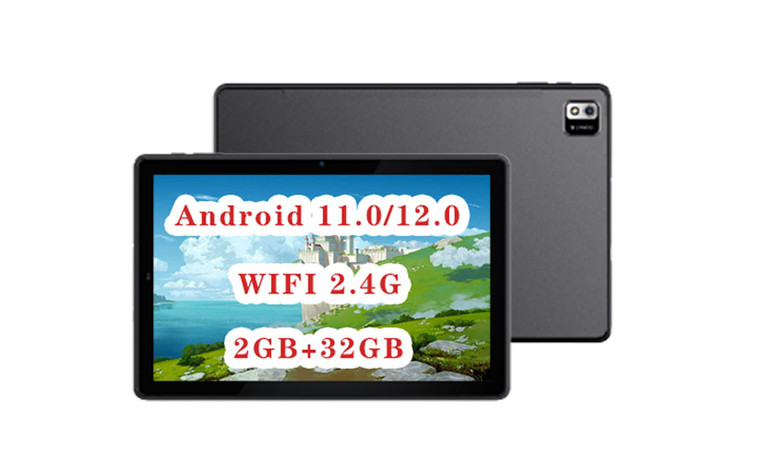
2308 NEW LOVII 10 inch tablet computer 2+32g 7617
https://drive.google.com/file/d/1O7_8fVzfhaKUuNl2H_G_iXbRXPwsMfnw/view?usp=drive_link
| Configuration | CPU | A133 Cortex A53 Quad core 64 bit |
| Memory | DDR:2GB | |
| EMCP | 32GB | |
| WiFi | WIFI 2.4G | |
| camera | Front :2 MP | |
| Rear: 5MP | ||
| OS | Google Android 11.0/12.0 | |
| Display | Screen | 10.1 inch 800*1280IPS |
| TP | Five point touch capacitive screen (P+G) | |
| Language | Chinese (Simplified),Chinese (Traditional),English,French,German,Italian,Japanese,Korean ,Russian, Spanish,Polish ,Czech ect. | |
| Others | G-SENSER | support |
| GPS | support | |
| BT | support | |
| FM | support | |
| Battery | 4000MA,3-4hours | |
| Power Device | AC100-240V.50-60H, DC 5V 2A | |
| Device | Color | customizable |
| Size | 248.0mm*164.9mm*9.4mm | |
| Weight | ||
| Software | Office | EPUB, WORD, EXCEL, POWERPOINT, PDF, TXT |
| Gmail, POP3/SMTP/IMAP4 | ||
| Others | QQ, Video Player, Google Map, Play Store | |
| Multi-Media | ||
| Entertainment | Video | AVI, MP4, 3GP, MKV, WMV etc. |
| Audio | MP3, WMA, OGG, AAC, WAV FLAC etc. | |
| Picture | JPG/BMP/PNG/GIF | |
| E-Book | PDF/TXT/CHM/DOC/EXCEL/EPUB/RTF/FB2 | |
| Interface | 1 x Type_C Interface | |
| 1 x Earphone Jack |
"Dear Valued Customer,
We would like to provide you with an important reminder regarding the contents of your package. Inside, you will find an SD card. It's essential to note that this is not a standard memory card; rather, it is an SD card preloaded with a system reinstallation tool designed to troubleshoot equipment issues. Please take note of this distinction.
To ensure a smooth and successful experience, we have included a usage tutorial below:
**Usage Tutorial:**
1. **Important Data Backup:** Prior to proceeding, we strongly recommend saving any critical information to prevent data loss.
2. **Step 1 - Shutdown:** First, power down your equipment.
3. **Step 2 - SD Card Insertion:** Insert the provided SD card into the designated slot.
4. **Step 3 - Boot and Progress:** Power on your equipment and hold until the boot interface displays a green progress bar. Allow the progress bar to complete its cycle.
5. **Step 4 - SD Card Removal:** Once the progress bar has finished, safely remove the SD card.
6. **Step 5 - Factory Reset:** Restart your equipment to initiate the factory reset process.
Should you encounter any issues or require further assistance, please do not hesitate to reach out to our dedicated customer service team.
Customer Service Email:
- info@jaoyeh.com
- support@jaoyeh.com
Thank you for choosing us, and we are here to assist you in any way we can.
Warm regards,
[Your Company Name]"
Related Products
-
-
-
-
Lovii Premier 14inch Laptop
£1,200.00